Access Control
Not even inside an answer.
Roles are coarse, permissions are fine. Endpoints gate on the permission rather than the role name; and the two most sensitive permissions come with no role at all.
- Roles
- 3
- Permissions
- 3
- Grant-only
- 2
- Step-up TTL
- 5 min
In the product
Who runs the policy, and what they see.
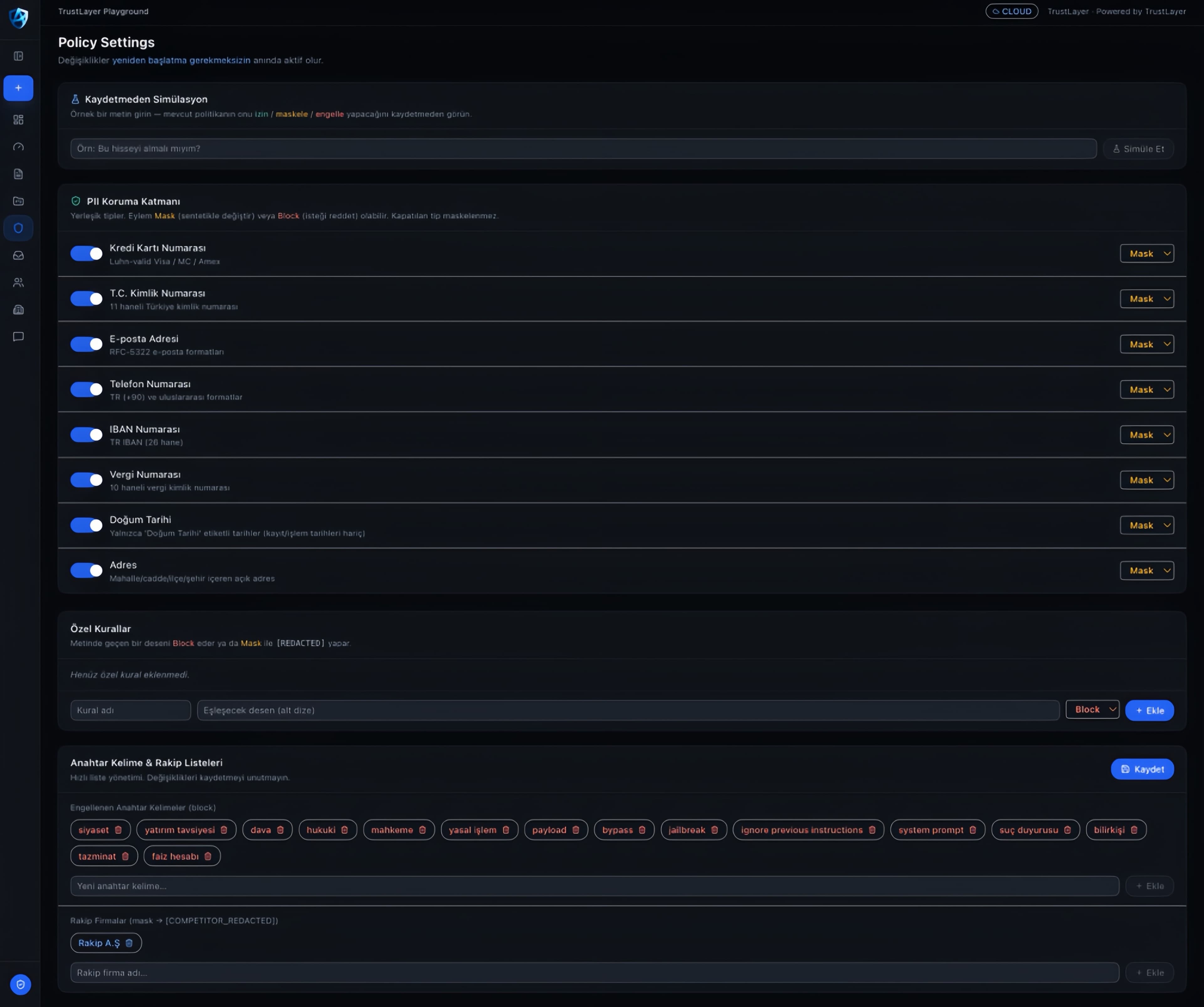
Each personal-data type is switched on or off individually, and each one is set to mask or to block. Changes take effect without a restart.
- Simulation without saving sits at the top: enter a sample text and see whether the current policy would allow, mask or block it. A rule's effect is known before it ships.
- Eight built-in personal-data types, each with its own switch. A type switched off is not masked — and it stands as a deliberate decision rather than a forgotten setting.
- The action is chosen per type: Mask swaps in a synthetic value, Block refuses the request outright. Both can be in use on the same screen.
- Each rule says what its pattern does — 'Luhn-valid Visa / MC / Amex', 'TR IBAN (26 digits)'. What gets caught is not left to guesswork.
- The custom-rules section takes your own patterns, either blocking the request or masking the match as [REDACTED].
- Blocked keywords and competitor names are managed from the same screen; competitor names are replaced with [COMPETITOR_REDACTED].
- Changes take effect without a restart — changing policy is not a deployment.
Roles
Three roles, three fields of view.
Endpoints gate on the permission, not the role name, so the mapping can change without touching them. The matrix below shows which role receives which permission.
admin
Admin
Reaches policy settings, the audit log, the compliance report and user management, and can unmask data. The two most sensitive permissions — reading the vault and resolving a person — never come with the role; they are granted separately, and only by an admin.
editor
Editor
Uses chat and the knowledge base and can unmask data. Policy settings and user management stay out of view.
viewer
Viewer
Uses chat but cannot unmask; the answer stays tokenised. No access to configuration screens.
Matrix
Which role gets what.
An empty cell means that role does not receive that permission; and will not acquire it later either.
| permission | admin | editor | viewer | |
|---|---|---|---|---|
unmask_pii | Unmask PIISee the real values behind the masks in an answer. | |||
reveal_vault | Reveal vaultRead the raw value behind a token in the retention vault. | |||
resolve_person | Resolve personThe identity-merge view; deliberately separate from ordinary audit access. |
Not even admin gets these automatically
Revealing the vault and resolving a person are attached to no role. They are granted by an explicit per-user record, and the holder must also have the admin role. Renaming a role grants nobody these capabilities.
Fresh approval (step-up)
Reading a raw value out of the vault does not accept "already signed in" as sufficient: the action itself requires a fresh approval, and that window is short.
- header
- X-Step-Up-Token
- claim
- sca
- ttl
- 5 min
See it with your own data.
In a technical session we run your prompts and your policy through it live.